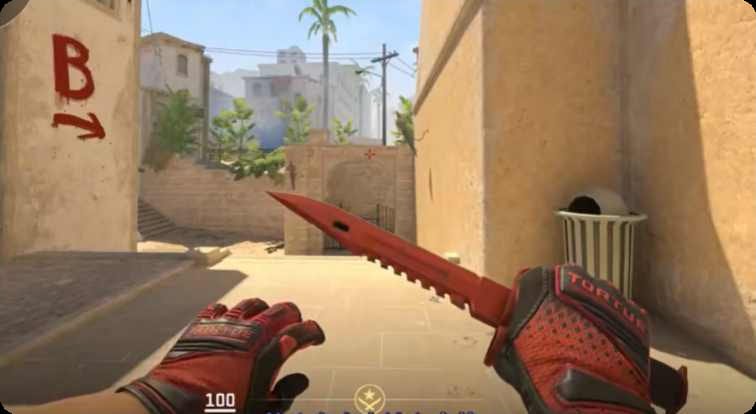
When you're diving deep into the vibrant world of CS2 skins, the sheer volume of options can be overwhelming. From rare patterns to subtle wear variations, truly understanding a skin's appeal often goes beyond a simple thumbnail. That's where CS2 Skin Simulators & Visualizers step in, transforming a potentially expensive gamble into a confident, informed decision. These powerful tools let you inspect virtually any skin, apply stickers, tweak wear values, and even preview them in different in-game lighting conditions—all before you commit a single dollar.
At a Glance: Your Essential Guide to CS2 Skin Visualizers
- Virtual Try-On: Inspect any CS2 skin, even those you don't own, without cost or commitment.
- Precision Details: Adjust float values to see wear, apply stickers, and test pattern variations.
- Lighting Matters: Preview skins in various in-game maps and lighting to assess their true look.
- Informed Decisions: Essential for planning loadouts, making trade decisions, or even just appreciating skin art.
- Not Gambling: These tools are purely visual and do not involve actual skin acquisition or trading.
Why Virtual Inspection is a Game-Changer for CS2 Players
Imagine you're eyeing a Factory New Karambit | Doppler, but you're torn between a Phase 1 and a Phase 2. Or maybe you've got a specific sticker combination in mind for your new AK-47 | Printstream, and you want to ensure it looks just right before you spend real money. Historically, this meant relying on tiny marketplace images, grainy YouTube videos, or hoping a friend owned the exact item. It was a shot in the dark, often leading to buyer's remorse when a skin didn't quite live up to expectations in-game.
CS2 skin visualizers eliminate that guesswork. They offer a virtual sandbox where you can experiment endlessly, bringing skins to life with unprecedented detail. It's not just about saving money; it's about empowering your creativity and ensuring every cosmetic choice you make truly reflects your style. Whether you're a casual player looking for a cool new pistol or a seasoned trader making high-value investments, these tools are indispensable for navigating the complex skin economy with confidence.
Understanding the Magic Behind Skin Simulators & Visualizers
At their core, CS2 skin visualizers are sophisticated web applications or software tools that render 3D models of CS2 weapons and apply skin textures to them. They're built by passionate community members and developers, often leveraging data directly from the game's files to ensure accuracy.
Think of it like a virtual showroom for your favorite in-game items. You choose a weapon, select a skin, and the visualizer immediately displays it. But it doesn't stop there. These tools go deep, allowing you to manipulate key attributes that dictate a skin's unique appearance:
- Float Value (Wear): Every CS2 skin has a float value, a number between 0 and 1 that determines its wear level (e.g., Factory New, Minimal Wear, Battle-Scarred). Visualizers let you precisely input any float value, showing you exactly how scuffed, pristine, or aged a skin will appear.
- Pattern Index: Many skins, especially those with intricate patterns like Case Hardened, Fade, or Doppler, have a unique "pattern index." This index determines the specific arrangement or intensity of the pattern on the weapon model. A good visualizer will allow you to cycle through different pattern indexes to find that perfect blue gem or vibrant fade percentage.
- Sticker Placement: This is where personal customization truly shines. Visualizers enable you to virtually "slap" stickers onto your weapon models, experimenting with different positions, rotations, and even layers. You can test sticker combos without the permanent commitment and cost of in-game application.
- Lighting & Environment: A skin can look dramatically different under various lighting conditions. Top-tier visualizers offer the ability to switch between different in-game maps or custom lighting setups. This helps you gauge how a skin will truly pop (or fizzle) during a match on Inferno vs. Overpass.
While the term "simulator" sometimes implies a game-like experience with inventory management, most of what players refer to are powerful "visualizers" or "inspectors." Sites like inspect.skin and cs2inspects.com exemplify this, providing dedicated platforms purely for detailed inspection, rather than full-blown game simulations.
What Makes a CS2 Skin Visualizer Stand Out?
Not all visualizers are created equal. When choosing a tool to trust with your virtual loadout planning, here are the critical features to prioritize:
Unparalleled Visual Accuracy
This is non-negotiable. The visualizer must render skins with a high degree of fidelity, closely matching how they appear in the actual CS2 game. Look for:
- Precise Float Simulation: Can you input exact float values (e.g., 0.0001 or 0.798) and see the corresponding wear?
- True-to-Game Textures: Do the colors, finishes (matte, glossy, metallic), and details look authentic?
- Accurate Pattern Generation: For skins like Case Hardened or Gamma Doppler, does the pattern index faithfully reproduce the in-game result?
Dynamic Sticker Customization
Stickers are a huge part of personalization. A robust visualizer should offer:
- Extensive Sticker Library: Access to a vast collection of CS2 stickers.
- Flexible Placement: Drag-and-drop functionality to position stickers precisely on the weapon model.
- Rotation and Scaling: Ability to rotate stickers and adjust their size for perfect alignment.
- Scratch Simulation: Some advanced visualizers even show how stickers would look after being scratched in-game.
Real-World Lighting and Environments
A skin's appeal is heavily influenced by lighting. The best visualizers let you:
- Cycle Through Maps: Preview skins on various iconic CS2 maps (Dust II, Mirage, Nuke, etc.) to see how ambient light affects them.
- Adjust Light Sources: Some tools offer advanced lighting controls, letting you manipulate light direction and intensity.
- High-Quality Rendering: Ensures shadows, reflections, and material properties react realistically to the chosen environment.
Comprehensive Weapon & Skin Database
You don't want to switch tools just because one skin isn't available. A top visualizer should boast:
- Up-to-Date Inventory: Rapidly integrate newly released cases and operation skins.
- Full Weapon Roster: Every rifle, pistol, SMG, heavy weapon, and knife should be available.
- Easy Search & Filter: Quick ways to find specific skins by name, weapon type, rarity, or collection.
User-Friendly Interface and Performance
A powerful tool is useless if it's clunky to navigate. Prioritize:
- Intuitive Controls: Easy to rotate, zoom, and manipulate the weapon model.
- Smooth Performance: Minimal lag or stuttering, even with complex skin renders.
- Cross-Device Compatibility: Works well on desktop browsers, and ideally, on mobile devices too.
Sharing and Export Options
Once you've crafted your perfect loadout, you'll want to share it. Look for:
- High-Quality Screenshots: Ability to capture your visualizer scene with custom backgrounds.
- Direct Share Links: Generate URLs to easily share your unique skin inspection with friends or communities.
Simulator vs. In-Game Inspection: Which One When?
While nothing truly beats seeing your skin in your actual inventory during a live match, visualizers offer distinct advantages that complement, rather than replace, in-game inspection.
The Power of Simulators/Visualizers
- Access to Unowned Skins: The biggest advantage. You can inspect any skin, regardless of its rarity or market price, without having to buy it first.
- Cost-Free Experimentation: Test countless sticker combinations, float values, and patterns without financial risk.
- Controlled Environment: Manipulate lighting, rotate objects freely, and focus purely on the skin's aesthetics without game distractions.
- Side-by-Side Comparisons: Easily compare multiple skins or different float values of the same skin simultaneously.
- Loadout Planning: Plan your entire weapon arsenal, including specific weapon models and gloves, for a cohesive look.
The Limits of In-Game Inspection
- Requires Ownership: You must own the skin (or borrow it) to inspect it in-game.
- Limited Customization: You can't change float values or dynamically apply stickers on a whim.
- Fixed Lighting: In-game lighting conditions vary by map and time of day, making consistent evaluation difficult.
- No "What Ifs": Hard to visualize alternative patterns or sticker placements without buying/trading.
When to use a visualizer: For initial research, pre-purchase decisions, extensive customization planning, or simply admiring rare skins you can't afford.
When to rely on in-game inspection: To confirm the final look of a skin you've acquired, check its actual market float value (if you already own it), or see how it feels during gameplay.
Your Step-by-Step Guide to Using a CS2 Skin Visualizer
Ready to dive in and design your dream loadout? Here’s how to effectively use a CS2 skin visualizer:
Step 1: Choose Your Platform
Start by selecting a reliable visualizer. Popular web-based options include sites like inspect.skin or cs2inspects.com, which are often fast and require no downloads. There might also be desktop applications or community-made tools. For our purposes, we'll assume a web-based visualizer.
Step 2: Select Your Weapon and Skin
Upon loading the visualizer, you'll typically see a menu or search bar.
- Select Weapon: Choose the weapon category (Rifle, Pistol, Knife, Gloves) and then the specific weapon model (e.g., "AK-47").
- Select Skin: Browse or search for the skin you're interested in (e.g., "Neon Rider").
The selected skin will immediately render on the weapon model in the main viewer.
Step 3: Manipulate Float Value and Pattern
This is where you refine the skin's wear and unique pattern:
- Float Input: Look for a "Float Value" or "Wear" slider/input box. Type in a specific float (e.g., 0.005 for a very clean Minimal Wear, or 0.5 for a well-worn Battle-Scarred). Watch how the skin instantly changes.
- Pattern Index: If the skin has a pattern (like a Case Hardened), find the "Pattern Index" input. Cycle through numbers (e.g., 0-1000) to see how the pattern shifts. This is crucial for finding "blue gems" or unique fades.
Step 4: Add and Position Stickers
Personalize your weapon with stickers:
- Open Sticker Menu: Find the "Stickers" section, often a button or tab.
- Select Stickers: Browse the library and click on stickers to add them to your weapon. Most weapons have multiple sticker slots (usually 4-5).
- Position & Rotate: Once a sticker is on, drag it to your desired slot. Use controls to rotate, scale, or even scratch the sticker if the visualizer supports it. Experiment with layering for unique effects.
Step 5: Test Different Environments and Lighting
See how your creation looks in action:
- Environment Selector: Locate the option to change the environment or map.
- Cycle Through Maps: Click through options like "Dust II," "Mirage," "Office," or "Custom Light." Pay attention to how the skin's reflections and colors shift. A skin that looks great in a bright studio environment might appear dull on a dark map.
Step 6: Capture and Share Your Vision
Once you're satisfied, share your custom skin:
- Screenshot/Export: Most visualizers offer a button to take a high-resolution screenshot.
- Share Link: Some advanced tools can generate a unique URL that saves all your customizations, allowing you to share your exact inspection with others. This is perfect for getting feedback from friends or showing off your potential purchase in community forums.
Remember, while these tools are incredibly accurate, real-world conditions (like your monitor settings or in-game shaders) can still introduce minor differences. Use visualizers as a powerful planning and decision-making aid, but always be prepared for tiny nuances when you see the skin in your own game. If you're looking to delve even deeper into the world of inspecting and generating skin combinations, consider exploring comprehensive guides that help you inspect and generate CS2 skins efficiently, streamlining your process.
Beyond Basic Inspection: Advanced Applications
Skin visualizers aren't just for casual players. They offer a wealth of utility for the more serious collector, trader, or content creator.
Strategic Investment Planning
For traders, a skin's float value and pattern are critical determinants of its market price. Visualizers allow you to:
- Identify "Holy Grail" Floats: Easily preview what a skin looks like at extreme low (or high) floats to understand its premium appeal.
- Pattern Scouting: For items like Case Hardened knives, visualizers are essential for identifying rare "blue gem" patterns that command massive prices. You can input hundreds of pattern indexes in minutes.
- Market Analysis: Compare how different conditions or patterns of a skin look side-by-side to understand why certain variations fetch higher prices.
Cohesive Loadout Construction
Beyond individual skins, visualizers help you build a themed inventory:
- Color Matching: Test how different weapon skins, knife skins, and glove combinations work together to create a unified aesthetic.
- Themed Inventories: Plan entire loadouts based on specific colors (e.g., "redline" theme), collections (e.g., "Ancient" theme), or even artistic styles.
- Budgeting Visuals: Find visually appealing alternatives if your dream skin is out of budget, by inspecting similar-looking skins at lower price points.
Content Creation and Community Engagement
For streamers, YouTubers, or community managers, visualizers are invaluable:
- Showcasing Rare Items: Display rare or expensive skins for viewers without having to own them.
- Concept Art: Create mock-ups of dream loadouts for videos, guides, or social media posts.
- Tutorials: Demonstrate how different floats, patterns, or sticker placements affect a skin's appearance in educational content.
- Community Polls: Generate images of different sticker combos and ask your audience to vote on their favorite.
Common Myths and Misconceptions About Skin Simulators
Despite their widespread use, some myths persist about CS2 skin visualizers. Let's clear them up.
Myth 1: Skin Simulators are a Form of Gambling
Fact: Absolutely not. Skin visualizers are purely aesthetic tools. You cannot "win" or "lose" skins, open cases, or engage in any form of betting. They are digital sandboxes for visual inspection and customization, using virtual representations of skins. No real money or actual in-game items are exchanged or gambled.
Myth 2: The Skins Look Exactly the Same In-Game
Fact: They look very close, often indistinguishable to the untrained eye, but minor differences can exist. Factors like your personal monitor calibration, in-game graphics settings, specific map lighting (which can sometimes be more dynamic than a visualizer's static environment), and even the exact viewing angle in-game can introduce subtle variations. Visualizers aim for extreme accuracy, but they are still a simulation. Always consider them a highly reliable preview, not a 100% exact replica in all possible scenarios.
Myth 3: You Can Get Free Skins from a Simulator
Fact: This is a firm no. Visualizers are for inspecting skins, not acquiring them. Any website or tool claiming to give you free CS2 skins by using a simulator is a scam. Legitimate visualizers clearly state that they are for preview purposes only and do not interact with your Steam inventory or provide actual items.
Myth 4: Only Expensive Skins Need Visualizing
Fact: While high-tier skins often have more complex patterns or float-dependent looks, even common skins can benefit from a visualizer. Want to see how a cheap sticker combo looks on your Desert Eagle | Bronze? Or compare the wear on a Field-Tested vs. Minimal Wear M4A4 | Buzz Kill? Visualizers are helpful across the entire spectrum of skin prices, ensuring you're happy with any purchase, big or small.
How to Choose the Right Visualizer for Your Needs
With several options available, picking the best tool comes down to your priorities:
- Web-Based vs. Desktop Application:
- Web-Based (e.g., inspect.skin, cs2inspects.com): Pros: No download required, accessible from any device, always up-to-date, often free. Cons: Requires internet connection, performance can vary with browser/internet speed.
- Desktop App: Pros: Potentially better performance and graphics, works offline (once downloaded), more advanced features. Cons: Requires installation, might be less frequently updated, could be paid.
Recommendation: Start with web-based options for ease of use and accessibility. - Feature Set: Do you need just basic float inspection, or do you want advanced sticker manipulation, environment changes, and pattern index exploration? List your must-have features.
- Community Reputation: Check reviews, community forums (like Reddit's CS2 subreddits), and testimonials. A tool with a strong, positive reputation is generally more trustworthy and accurate.
- User Interface: A clunky UI can make even the most powerful visualizer frustrating to use. Prioritize tools that feel intuitive and responsive.
- Updates and Maintenance: Is the visualizer regularly updated with new skins and features? An actively maintained tool ensures accuracy with the latest CS2 content.
The Horizon: What's Next for Virtual Skin Inspection?
The world of CS2 skins is constantly evolving, and so too are the tools used to appreciate them. We can expect future skin visualizers to push boundaries even further:
- Enhanced Realism: As graphics technology improves, visualizers will strive for even greater fidelity, blurring the lines between simulation and reality. Expect even more accurate reflections, material properties, and dynamic lighting.
- Virtual Reality (VR) & Augmented Reality (AR) Integration: Imagine inspecting your dream inventory in a fully immersive VR environment, or even "placing" a virtual Karambit on your desk via AR. This could revolutionize how players interact with cosmetics.
- Deeper Market Integration: While not directly acquiring skins, future tools might seamlessly integrate real-time market data, allowing you to instantly see prices and availability for the exact float/pattern you're visualizing.
- AI-Powered Customization: AI could potentially suggest sticker combinations, loadout themes, or even generate unique pattern variations based on your preferences.
- Social & Collaborative Features: More robust sharing options, collaborative loadout building with friends, or even community-driven design challenges within the visualizer itself.
Mastering Your Virtual Loadout: Your Next Steps
CS2 skin visualizers are more than just fancy tools; they're essential companions for any player serious about their in-game aesthetics or smart about their trading decisions. They empower you to explore, experiment, and envision your perfect loadout without financial risk or commitment.
Your next step is simple: Dive in! Pick a visualizer that catches your eye, whether it's a popular web-based option or a community-favorite desktop app. Start by inspecting skins you already own to get a feel for the tool's accuracy. Then, unleash your creativity. Experiment with dream loadouts, design outlandish sticker combos, and discover the hidden beauty in skins you might have previously overlooked.
By leveraging these powerful tools, you'll not only save money and avoid buyer's remorse, but you'll also gain a deeper appreciation for the artistry and intricate details that make CS2 skins such a beloved part of the game. Your ultimate virtual loadout is just a few clicks away.